

Customer Profile+ and Bank Account Creation
Overview
Under the first party transfer (CP+) integration model, you must create a CP+ account for each of your user. Each CP+ account must have a verified customer profile bank account attached to it to enable first party withdrawals.
CP+ requires extensive KYC/KYB information and goes through a verification process before the account is fully activated.
Sequence Diagram
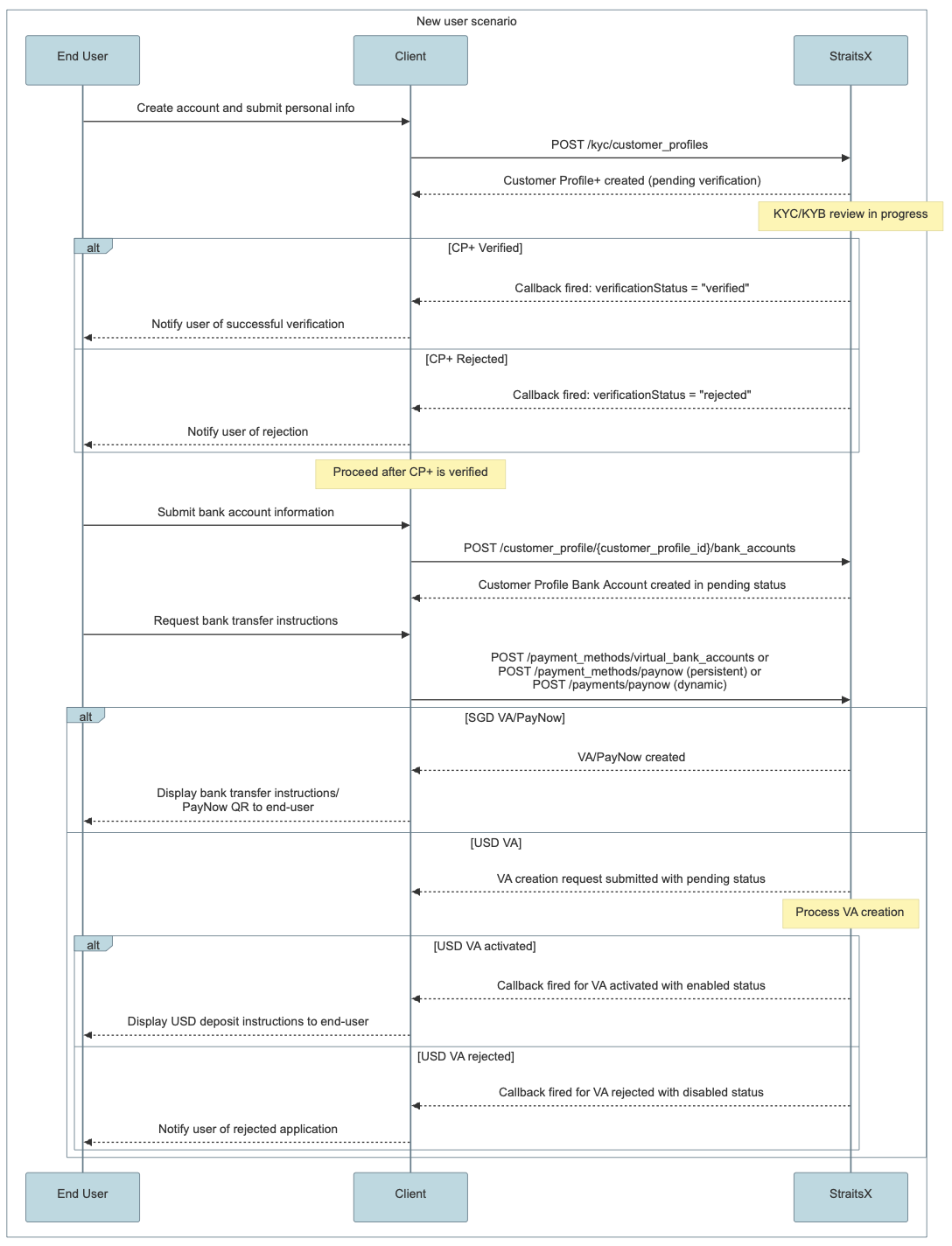
Customer Profile+ Creation
Once your user has created an account and provided their personal information on your platform, you need to create what we call a customer profile+. A customer profile+ is a profile in the StraitsX system representing your user. This is a pre-requisite for accessing payment and payout APIs under the First Party Transfer (CP+) integration model.
CP+ supports both Personal and Business account types. The mandatory fields differ based on the type.
Mandatory Fields — Business CP+
| Field | Description |
|---|---|
customerName | Business legal name (50 alphanumeric with spaces) |
registrationType | business |
registrationIdType | business_reg_no |
registrationId | Business Registration Number (UEN) |
entityLegalForm | PRIVATE_COMPANY or PUBLIC_COMPANY |
businessContact | Contact phone number |
countryOfIncorporation | 2-digit ISO country code |
dateOfIncorporation | yyyy-MM-dd format |
address | Registered address (street, city, state, country required) |
operatingAddress | Operating address (street, city, state, country required) |
natureOfBusiness | Business activity type |
usOwnership | true / false |
intermediaries | true / false |
monthlyTransactionVolume | Expected monthly volume range |
sourceOfFunds | Array of fund sources |
directors | Array of director details |
beneficialOwners | Array of beneficial owner details |
trader | Trader/authorized person details |
documents | KYB documents |
purposeOfAccount | Purpose of the account |
For the full list of accepted values and field formats, refer to the Create a business customer profile+ API reference.
Mandatory Fields — Personal CP+
| Field | Description |
|---|---|
customerFirstName | First name |
customerLastName | Last name |
registrationType | personal |
registrationId | NRIC/Passport number |
registrationIdType | identity_card, passport, etc. |
registrationIdCountry | 2-digit ISO country code |
address | Residential address (street, city, state, country required) |
countryOfResidence | 2-digit ISO country code |
dateOfBirth | yyyy-MM-dd format |
email | Email address |
gender | MALE or FEMALE |
nationality | 2-digit ISO country code |
businessIndustry | Industry classification |
occupation | Occupation type |
expectedAnnualTransactionAmount | Expected annual volume range |
expectedTransactionSize | Expected per-transaction size range |
expectedTransactionFrequency | Expected frequency |
annualIncome | Annual income range |
totalWealth | Total wealth range |
identityDocuments | KYC identity documents |
ipAddresses | Array of IP addresses |
purposeOfAccount | Purpose of the account |
For the full list of accepted values and field formats, refer to the Create a personal customer profile+ API reference.
Customer Profile+ Bank Account Creation
Your user will also need to add a bank account on your platform. For Singapore banks, you can obtain the list of supported banks via our endpoint.
Ensure that the correct bank code is submitted
Some banks may have multiple bank codes - you should ensure the correct one is being submitted to avoid any subsequent payment/payout failures. For instance, HSBC Business Account uses
HSBCand HSBC Personal Account usesHBSC2; Malayan Banking Berhad usesMBBand Maybank Singapore usesMBB2.
StraitsX will expect to receive funds from this bank account and will only allow withdrawals to the same bank account after it has been verified. Upon the first successful deposit, the sender's bank account will be automatically added and verified. Alternatively, you could also request for proof of bank account from your user for manual verification of the bank account.
Sandbox Testing
To test your integration, you could mock the verification status of the bank account created.
Webhooks
When a customer profile+’s verification status is updated to rejected or verified, a callback will be triggered to the URL you configure on the StraitsX Dashboard.
For sample payloads and detailed field descriptions, see Customer Profile+ Callbacks (CP+).
Updated 5 months ago
What’s Next
Now that you have created a customer profile and bank account for your user, learn how to create a payment method to facilitate collections.