

Securing Your Callback
In order to secure your data, make sure the callbacks are coming from StraitsX in order to avoid attackers sending malformed data. The easiest way to verify the callbacks is to validate the signature that is sent along with the request.
1. Retrieve the signing secret from your dashboard
To begin verifying callbacks, you first need to obtain your active Signing Secret. This secret is a unique key used to generate the HMAC signature sent in every request from StraitsX.
- Locate your Secret: Navigate to your StraitsX Dashboard > Platform Tools > Callback URLs > Signing Key Section
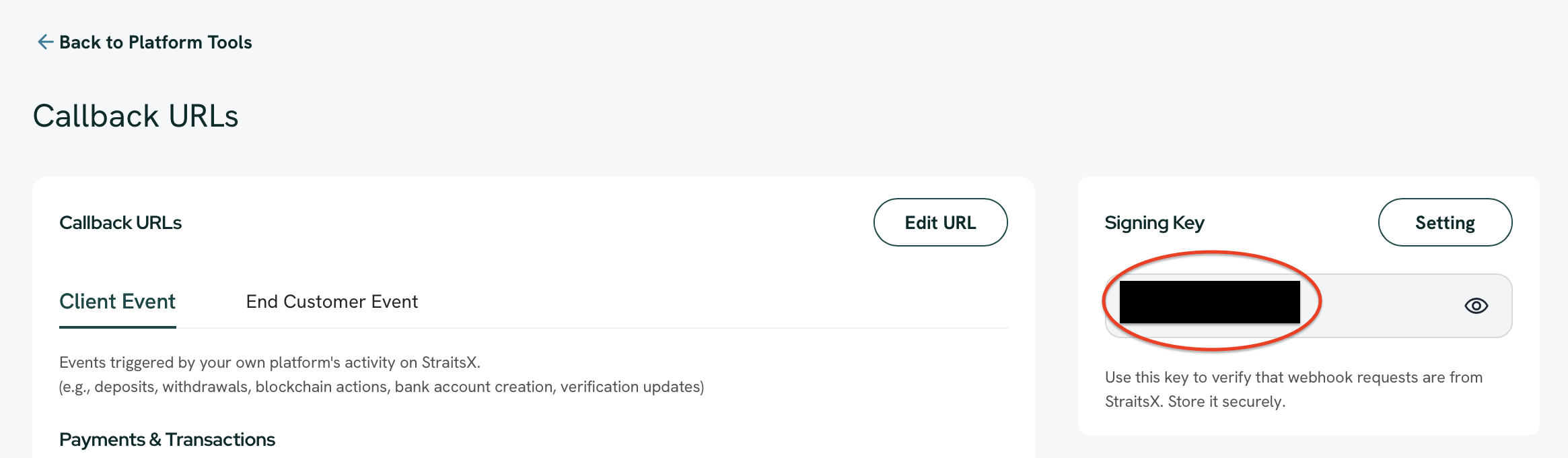
StraitsX Dashboard > Platform Tools > Callback URLs > Signing Key Section
- Copy the Active Key: Under the Signing Key section, you will find your currently Active secret.
- Security Best Practice: Never share this secret or commit it to public repositories. We recommend storing it as an environment variable in your application.
Note:
If this is your first time setting up, a signing secret will be automatically generated as soon as you create a API Key.
2. Calculate and compare HMAC Signature
Calculate the signature by using signing secret and request body with HMAC-SHA256 algorithm. For example:
# NOTE: It's recommended for you to put the secret in a secret file or environment variable.
# We are showing it directly in the code for illustration purposes only.
SIGNING_SECRET = "ss_5572cf13d099"

post '/callback' do
  request.body.rewind
  payload_body = request.body.read

  verify_signature!(request.headers["Xfers-Signature"], payload_body)

  puts "Got a valid request"
end

def verify_signature!(signature, payload_body)
  generated_signature = OpenSSL::HMAC.hexdigest(
    "SHA256",
    SIGNING_SECRET,
    payload_body,
  )

  raise "Invalid signature!" unless Rack::Utils.secure_compare(signature, generated_signature)
end
const express = require('express');
const crypto = require('crypto');
const bodyParser = require('body-parser');
const app = express();
const SIGNING_SECRET = "ss_5572cf13d099";
app.use(bodyParser.text());
app.post('/callback', (req, res) => {
const payloadBody = req.body;
const signature = req.headers["Xfers-Signature"];
verifySignature(signature, payloadBody);
console.log("Got a valid request");
res.status(200).send("OK");
});
function verifySignature(signature, payloadBody) {
const generatedSignature = crypto.createHmac('sha256', SIGNING_SECRET)
.update(payloadBody)
.digest('hex');
if (signature !== generatedSignature) {
throw new Error("Invalid signature!");
}
}
const PORT = 3000; // You can choose your desired port
app.listen(PORT, () => {
console.log(`Server is running on port ${PORT}`);
});3. Manage your signing secrets
To maintain high security standards, we recommend rotating your signing secret periodically. Our dashboard provides full control over the lifecycle of your secrets.
Rotating your secret
To ensure zero downtime during a credential update, you can manage the transition between secrets:
- Generate a New Secret: You can create a new signing secret at any time. This will initially be created in an Inactive state.
- Activate to Rotate: When you are ready to update your application code with the new key, click Activate.
Note:
Only one signing secret can be active at a time. Activating a new secret will automatically deactivate the previous one.
- Delete Inactive Secrets: Once a rotation is successful and your application is using the new key, you should delete the old, inactive secret to keep your environment clean and secure.
Full Control
This workflow allows you to prepare your infrastructure for a new key before making it "live", giving you full control over your security rotation process.
Updated 7 months ago