

Third Party Payout
Overview
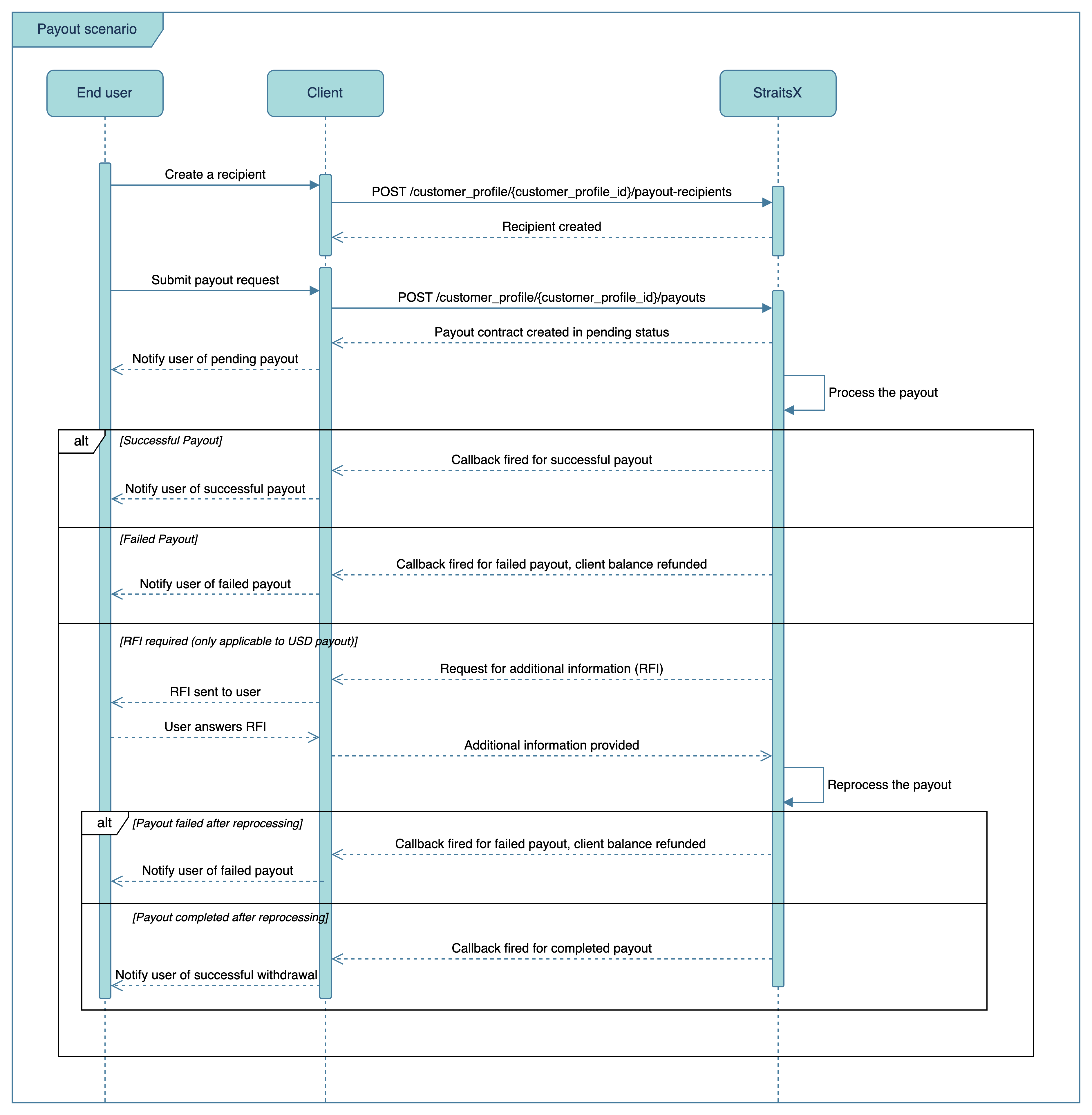
Payouts can be made to a payout recipient created. Different recipient types and countries will have different data requirements for a payout recipient to be valid. Similar to payments, a webhook callback will be triggered to your system to indicate the transaction status when it's updated.
Sequence Diagram
Payout Recipients
In order to create a payout, you first need to provide your users with the ability to add and manage recipients on your platform. When your user adds a recipient on your platform, call our create payout recipient endpoint.
Depending on the recipient country and disbursement method, the required fields for the payout recipient are different:
Required Fields (All disbursement methods)
| Field | Description |
|---|---|
recipientCountry | Alpha-2 country code (e.g. SG) |
recipientInformation.disbursementMethod | bankTransfer, paynow, swift, or meps |
recipientInformation.recipientName | Name of the recipient |
recipientInformation.currency | SGD or USD |
recipientInformation.entityType | individual or business |
Additional Fields by Disbursement Method
| Method | Currency | Required Fields | Optional Fields |
|---|---|---|---|
paynow | SGD | proxyType, proxyValue | - |
bankTransfer | SGD | bankAccountNo, bankShortCode | - |
swift | SGD, USD | swiftBic, bankAccountNo, recipientAddress | routingCode, intermediarySwiftBic, paymentReason |
meps | SGD | swiftBic, bankAccountNo, recipientAddress | routingCode, intermediarySwiftBic, paymentReason |
Note:
For SGD, all disbursement methods (
bankTransfer,paynow,swift,meps) are supported. For USD, onlyswiftis supported.
Processing Payouts
Once a recipient is added, your user should submit a payout request on your platform to the selected recipient. Create a customer profile payout request via our third party payout endpoint. A contract (i.e. transaction) will be created in pending status and returned in the response. Upon processing the payout, StraitsX will send a callback notification to you via the callback URL indicated on the StraitsX Business Dashboard. Learn more about callback configuration.
Sandbox TestingTo test your integration, you could initiate a withdrawal in sandbox and mock its status. Callback will also be sent in the sandbox environment.
Webhooks
Webhook callbacks use HTTP POST request and expects 200 OK in the response. Each failed webhook callback is retried up to 20 times with a 5-minute interval. If you need to retrigger callback for a single contract or a list of contracts, you can do so via our callback event endpoints .
For sample payloads and detailed field descriptions, see Payout Callbacks.
Updated 4 months ago