

Visa Card Tokenization
Visa Token Service is a security technology that replaces 16-digit Visa account numbers with a token that only Visa can unlock, protecting the underlying account information.
Advantages of this feature is that merchants and payment processors no longer need to store actual card numbers, dramatically reducing their security burden and potential liability.
Other than that, customers can perform contactless transactions on POS terminals using Apple Pay and Google Pay even before receiving the physical card. This immediate access to payments enhances convenience and enables faster onboarding, offering a seamless experience for customers who prefer mobile transactions.
Type of Card Token
Secure Element (SE)
This token type utilizes a microprocessor chip capable of storing sensitive data. It's exemplified by Apple Pay, which employs this secure hardware-based approach for protecting payment information.
Host Card Emulation (HCE)
HCE allows devices to mimic a physical card for consumer purchases. This technology is used by popular mobile payment platforms like Samsung Pay and Google Pay, enabling smartphones to act as virtual payment cards.
Card on File (COF)
In this model, a business stores the cardholder's payment card data with their consent. An example of this is the ride-hailing service Grab, which securely keeps user payment information for convenient future transactions.
Automatic Token Deactivation on Repeated Insufficient Balance
Starting September 3rd, 2026, COF tokens will be automatically deactivated after TWO insufficient balance declines without any successful authorization in between.
Key Details
- Applies to COF (Card-on-File) tokens only. Other token types are unaffected.
- Token is deactivated after 2 (two) consecutive insufficient balance declines without any successful authorization in between.
- Deactivated tokens are permanent. They cannot be re-activated or updated to other statuses.
- A successful transaction of any type at any point resets the counter.
- When a token is deactivated, you will be notified via the CARD_TOKEN_STATUS_CHANGED webhook event.
- Cardholder can re-tokenize their card again, but they should be encouraged to top up their balance before doing so.
Ecommerce (ECOM)
These tokens are specifically designed for online transactions. They're commonly used by e-commerce platforms such as Lazada and Shopee to facilitate secure online shopping experiences.
Card Token Provisioning Flow
Token provisioning is a process of providing a digital token to a customer's device or merchant's system. The process begins when a customer registers their payment card with a merchant app or digital wallet. The full provisioning flow can be seen in below diagram
ECOM and COF Token Provisioning Flow
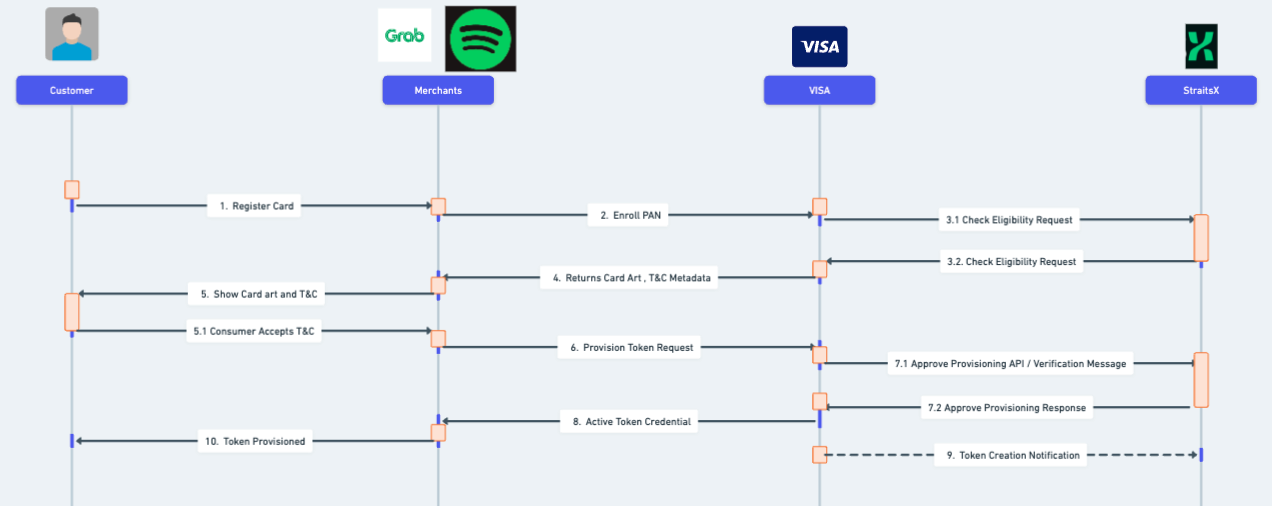
Flow details:
- Customer inputs card details to enroll cards into merchant apps.
- Merchants forward the enrollment request to Visa.
- Visa checks the card eligibility with StraitsX. For a card to be eligible for provisioning, StraitsX checks these conditions:
- Card status must be ACTIVE.
- Remote host is already providing card metadata (card art and T&C) to StraitsX.
StraitsX returns the eligibility check result to Visa. In this step, StraitsX saves the customer card token data with INACTIVE status.
- Visa returns card art and T&C metadata to merchant.
- Wallet provider shows card art and T&C if applicable
- After customer accepts T&C, merchant requests token provisioning to Visa.
- Visa forwards the approve provisioning request to StraitsX. StraitsX determines if the provisioning is successful based on these conditions:
- CVV inputted by customer matches the card data.
- Expiry date inputted by customer matches the card data.
StraitsX return the approve provisioning result to Visa.
- Visa forwards the approve provisioning result to merchants.
- Asynchronously, Visa sends a token creation notification to StraitsX. StraitsX updates customer card token data status to Active.
- Card is ready to be used for transactions.
SE and HCE Token Provisioning Flow
SE and HCE token, which are used by Apple Pay and Google Pay respectively, have a different flow of provisioning, where there is an extra steps to verify customer via an OTP or customer center call
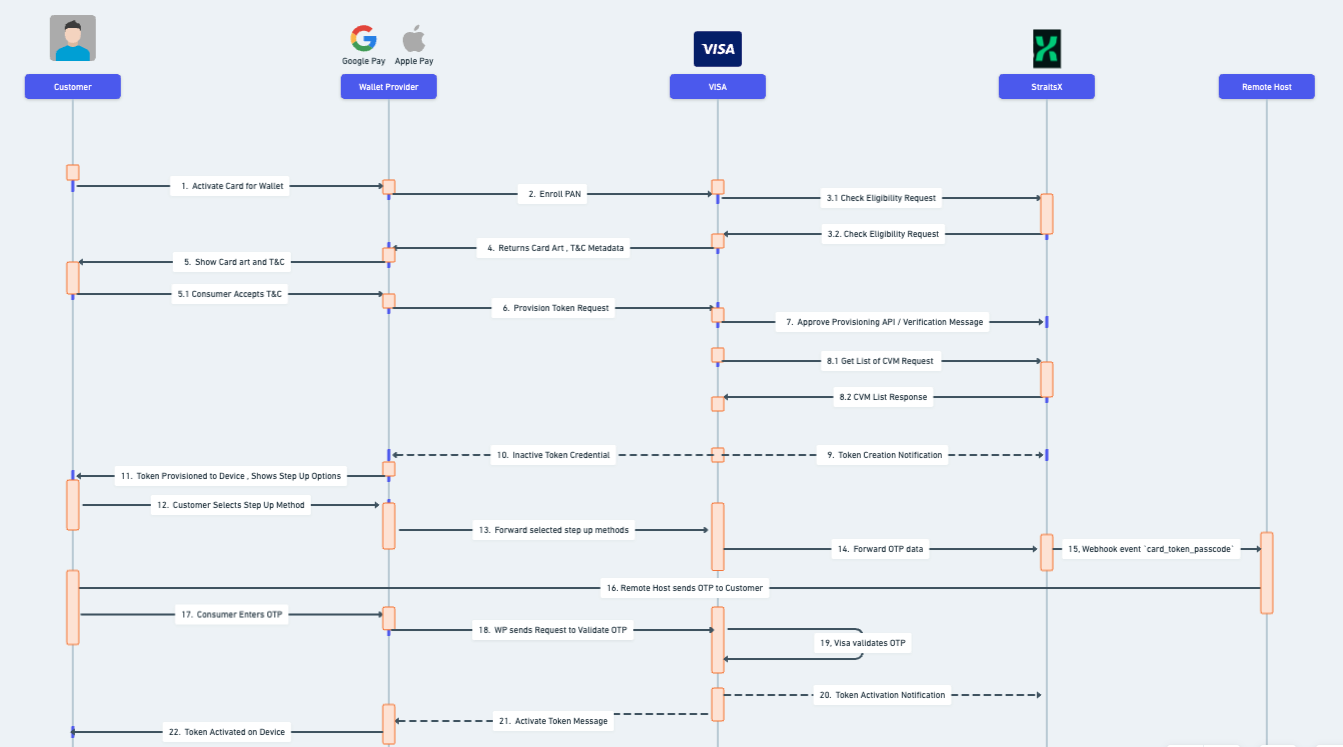
Flow details:
- Customer inputs card details to enroll cards into the wallet provider's application (Google Pay / Apple Pay wallet)
- Wallet provider forwards the enrollment request to Visa.
- Visa checks the card eligibility with StraitsX. For a card to be eligible for provisioning, StraitsX checks these conditions:
- Card status must be ACTIVE.
- Remote host is already providing card metadata (card art and T&C) to StraitsX.
StraitsX returns the eligibility check result to Visa. In this step, StraitsX saves the customer card token data with INACTIVE status.
- Visa returns card art and T&C metadata to the merchant.
- Wallet provider shows card art and T&C; customer needs to accept the T&C for provisioning to continue.
- After customer accepts T&C, wallet provider requests token provisioning from Visa.
- Visa forwards the approve provisioning request to StraitsX. StraitsX determines if the provisioning is successful based on these conditions:
- CVV inputted by customer matches the card data.
- Expiry date inputted by customer matches the card data.
StraitsX return the approve provisioning result to Visa.
- Visa requests a list of card verification methods from StraitsX. StraitsX will return these verification methods:
- Call Center - the phone number shown to the customer will be the number that the remote host submitted in the card profile metadata.
- SMS OTP - the destination phone number shown to the customer will be the number used to enroll the card into 3DS. If the card is not enrolled in 3DS, this verification method will not be shown to the customer. See Create 3DS Enrollment API details of the 3DS enrollment
StraitsX will return the verification methods to Visa to be displayed on customer device.
- Asynchronously, Visa sends a token creation notification to StraitsX. StraitsX will not set the token status to Active, unlike the provisioning flow of ECOM and COF tokens.
- Visa sends an Inactive token created event to the wallet provider.
- Wallet provider shows the list of verification methods to the customer.
- Customer selects the available verification method.
- Wallet provider forwards the selected verification method.
- Visa forwards the OTP data to StraitsX if the customer selects the SMS OTP method.
- StraitsX forwards the OTP data via webhook with a
card_token_passcodeevent type. See webhook notification API details for the webhook payload. - Remote host forwards the OTP to the customer.
- Customer enters the OTP in the wallet provider app.
- Wallet provider forwards the OTP to Visa.
- Visa validates the OTP.
- Visa sends a token activation notification asynchronously to StraitsX. StraitsX updates the token status to Active.
- Visa sends a token activation notification to the Wallet Provider.
- Card is provisioned on the customer's device and ready to be used for transactions.
Token Lifecycle
Card token have several status
- INACTIVE : the initial state of a token. The token is not provisioned on the device / merchant side yet but it's already created on the system. The card status will not affected during card provisioning.
- ACTIVE: token is activated and can be used for transaction. The card status will not affected during card provisioning.
- SUSPENDED: token is temporarily suspended and can't be used for transaction, but the token data is still saved on the customer device / merchant apps. Suspended token can be activated again. The card status will not be impacted if remote host / StraitsX / customer is suspending the card token.
- DEACTIVATED: token is permanently deleted on user device / merchant apps. The token can't be used for transaction and can't be activated again. The card status will not be impacted if remote host / StraitsX / customer is deactivating the card token. If customer wants to use their card for token based transaction again, then re-provisioning would be necessary.
Token lifecycle enables the remote host to activate, resume, suspend, or deactivating tokens. We provide a token lifecycle API that remote hosts can utilize to manually change the status of tokens linked to cards. See Card Token Status Update API for more information.
In addition to providing an API for remote hosts to manage token status, StraitsX also manages card token status when card status is updated via the Card Status Update API or closed via the Close Card API. The following actions are automatically performed:
- If a card's status is updated from active to temporarily blocked, StraitsX will update all active card tokens linked to that card to suspended (temporarily inactive).
- If a card's status is updated from temporarily blocked to active, StraitsX will update all suspended card tokens linked to that card to active.
- If a card is permanently blocked or closed, StraitsX will permanently delete all card tokens linked to that card, rendering them unusable for transactions. Furthermore, customer can't provision any tokens for the card which is permanently blocked.
Remote host can utilize Get Token List API to see the list of card tokens that is linked to the card.
Remote Host Authorization Changes
There will be some changes on remote host authorization payload for token based transaction
- Some of the
metadatafield will not be populatedsvfe_issuer_institution_idaccount_identificationaccount_id_2
- Additional data on remote host authorization
token_requestor_id: the requestor id that initiate the token provisioning, can be the id of merchant or wallet providertoken_reference_id: the token id that is saved in Visa systempan_reference_id: the PAN id that is saved in Visa systempan_source: the source of pan that is used to provisioning, one of this value:- KEY ENTERED: customer providing PAN data by entering the data using keyboard
- ON_FILE: customer providing PAN data by using card credentials that is saved on device
- MOBILE_BANKING_APP: customer providing PAN data via mobile banking app
- CHIP_DIP: customer providing PAN data via inserting card into EDC
- CONTACTLESS_TAP: customer providing PAN data via contactless tap
token_status: the token statusclient_wallet_account_id: the wallet account id that is saved on wallet provider app (Apple Pay / Google Pay)token_type: the token type, one of this value:- CARD_ON_FILE: token is saved on merchants application
- ECOMMERCE: token is used on ecommerce site
- HCE: host card emulation, token type for Google Pay
- SECURE_ELEMENT: secure element, token type for Apple Pay
token_opaque_id: the token opaque id
Please see Remote Host Authorization documentation for further information.
Updated about 2 months ago