
FX Payout API
The FX Payout API allows you to convert funds from one currency to another and disburse to the recipient's bank account, without needing to hold a balance in the target currency.
This is useful for cross-border payout scenarios where you want to send funds in a supported source currency and have the recipient receive funds in the target currency.
Supported Currency Pairs
The following currency pairs are currently supported:
| From | To |
|---|---|
| XUSD | IDR |
| XSGD | IDR |
| USD | IDR |
| SGD | IDR |
Prerequisites
Before initiating an FX payout, you need to create a payout recipient under the customer profile that will be used as the initiator. This recipient represents the Indonesian beneficiary who will receive the IDR funds.
Call the Create a customer profile payout recipient endpoint with the recipient's bank account details (e.g. bank name, account number, account holder name). The returned recipientId will be used in the payout request.
You can also retrieve existing recipients using the Get a list of customer profile payout recipients endpoint.
How It Works
The FX Payout flow consists of three steps: get a quote, create a payout, and track the payout status.
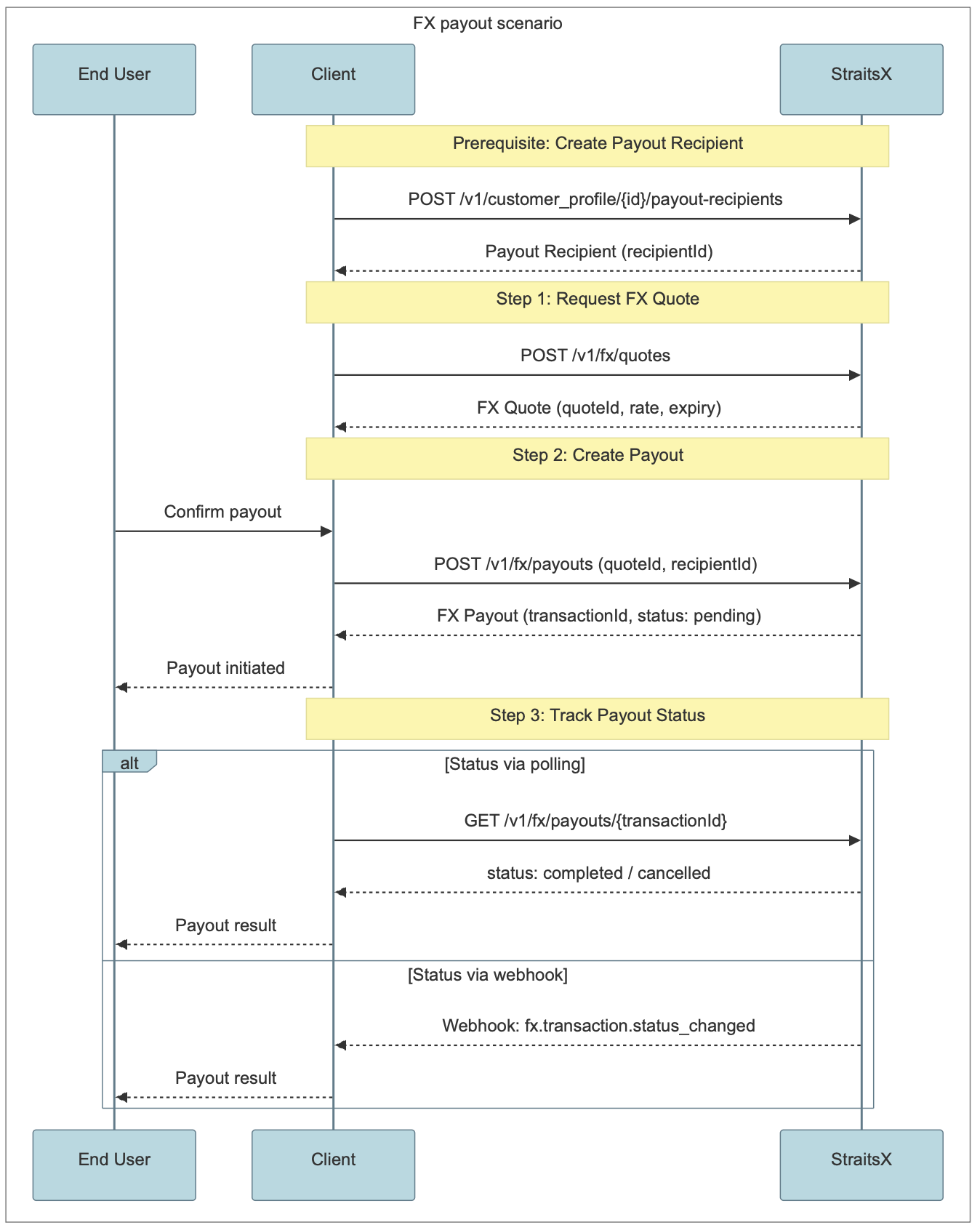
Step 1: Request an FX Quote
Call the Create an FX quote endpoint to get a rate for your desired currency pair and amount. You specify the source currency, target currency, the amount, and the tenor (instant).
Note:
Either
from.amountorto.amountmust be provided in the request, but not both. Ifto.amountis provided instead offrom.amount, the quote is computed in reverse.
Each quote returned has an expiry time. You must execute the quote before it expires.
Step 2: Create a Payout
While the quote is still valid, call the Create a payout endpoint with the quote ID to initiate the FX conversion and payout. You will need to provide:
- The initiator details (mode and customer profile ID)
- The payout details including the payout type (
fxPayout), recipient ID, FX quote ID, and an optional internal reference
Once the payout is created, it will be in pending status while the FX conversion and disbursement are being processed.
Step 3: Track Payout Status
You can track the status of your payout in two ways:
- Polling: Call the Get a payout or Get a list of payouts endpoints to check the current status.
- Webhooks: Register a callback URL to receive webhook notifications when the payout status changes. The webhook event is
fx.transaction.status_changed.
Transaction Statuses
| Status | Description |
|---|---|
pending | Transaction has been created and is being processed. |
completed | FX conversion completed successfully. Funds delivered to the recipient. |
cancelled | Transaction was cancelled before completion. |
The possible status transitions are:
pending→completedpending→cancelled
Sandbox Testing
In the sandbox environment, you can manually update a payout's status using the Update payout status (Sandbox) endpoint. This allows you to simulate the completed or cancelled status transitions for testing your integration.
Related API Endpoints
FX Quotes (Foreign Exchange)
- Create an FX quote — Request a quote for an FX conversion.
- Get an FX quote — Retrieve an existing quote by ID.
Payouts
- Create a payout — Execute an FX quote to initiate a cross-border payout.
- Get a list of payouts — Retrieve a paginated list of payouts.
- Get a payout — Retrieve a single payout by ID.
- Update payout status (Sandbox) — Manually update payout status in sandbox.
Updated 2 months ago